
XCAM1080PHB/D HDMI+WiFi Industrial Microscope Camera
The XCAM1080PHB/D is a C-mount industrial microscope camera with dual HDMI and WiFi output, designed for integration into microscope systems.
Product Overview
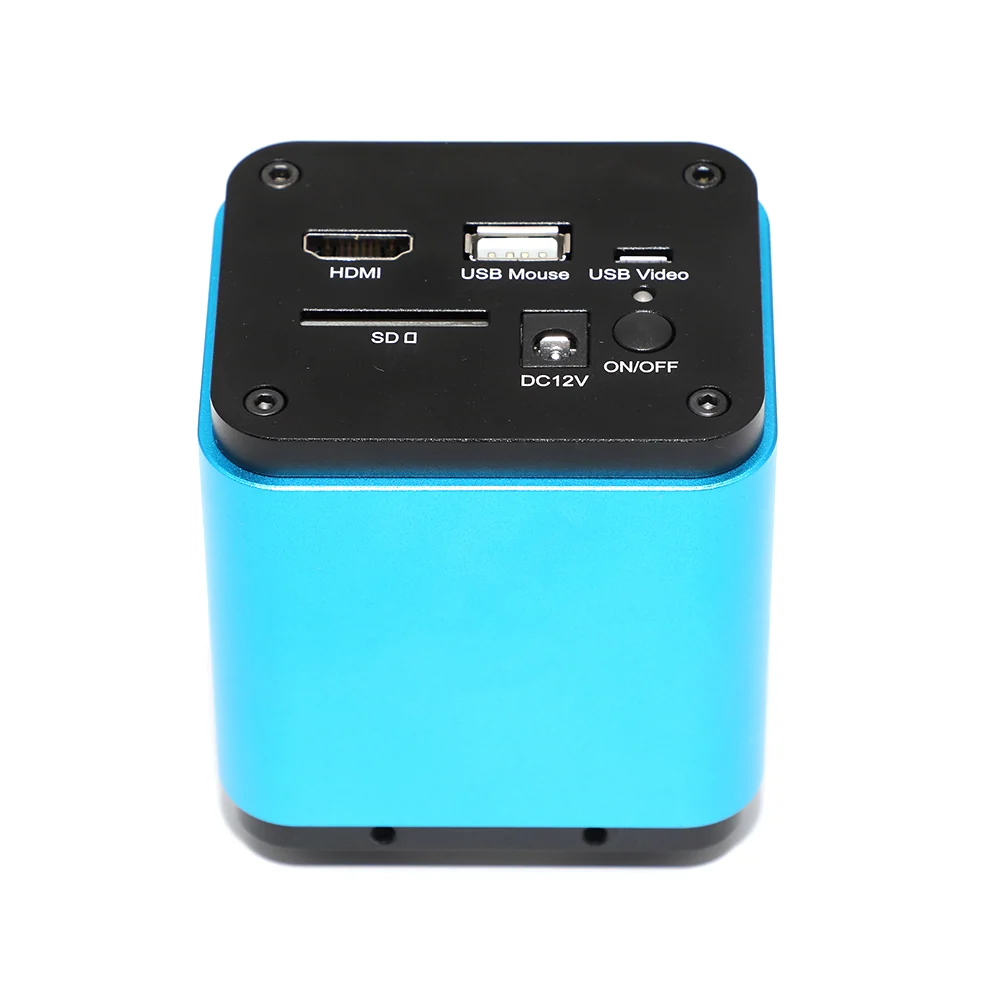
The XCAM1080PHB/D is a C-mount industrial microscope camera with dual HDMI and WiFi output, designed for integration into microscope systems. It supports 1080P resolution at 60fps over HDMI and 25fps over WiFi, with a Sony IMX178(C) or IMX185(C) sensor. The camera provides real-time image capture and recording with exposure control from 0.03ms to 918ms, and includes a built-in SD card slot for local storage. It operates on 12V DC power and supports USB2.0 mouse control via XCamView software.
- SensorSony IMX178(C) / IMX185(C)
- Sensor Size1/1.8" (6.22x4.67mm) / 1/1.9" (7.20x4.05mm)
- Pixel Size2.4x2.4μm / 3.75x3.75μm
- Sensitivity425mv (IMX178) / 1120mv (IMX185) with 1/30s
- Dark Signal0.15mv with 1/30s
- Frame Rate60fps @ 1920x1080 (HDMI), 25fps @ 1920x1080 (WiFi)
Key Benefits
- Dual HDMI and WiFi output allows simultaneous viewing on a monitor and remote access via mobile or PC
- 1080P resolution at 60fps over HDMI for high-speed inspection and documentation
- 0.03ms to 918ms exposure range enables precise control in bright or low-light conditions
- Built-in SD card slot stores JPEG images and ASF video files up to 1080P 30fps
- USB2.0 mouse control via XCamView software enables real-time adjustments to exposure, gain, white balance and sharpness
- Supports Auto White Balance and Ultra-Fine TM Color Engine for accurate color reproduction
- Operates on 12V DC power with a standard adapter, no external power supply needed
Application Scenarios
- Real-time inspection of PCB solder joints with live video streamed to a monitor and recorded for audit
- Remote inspection of micro-components via WiFi on a tablet or smartphone in a production line
- Documentation of metallurgical samples with high-resolution JPEGs stored on SD card
- Integration into a microscope stand for quality control in a semiconductor or watchmaking environment
- Teaching lab setup where multiple students view the same image on a shared screen via WiFi
Who It Is For
- Electronics manufacturers doing PCB, SMD and BGA inspection
- Quality control teams requiring image documentation with traceable timestamps
- Teaching laboratories needing remote or shared viewing for group instruction
- Research labs requiring high-speed, low-noise imaging for micro-mechanical or material analysis
- Precision assembly workshops using real-time visual feedback during micro-soldering or alignment
Problems It Solves
- A standalone camera without HDMI or WiFi forces the operator to use a PC monitor only, limiting mobility
- Fixed exposure settings in basic cameras cause overexposure in bright lighting or underexposure in dark areas
- Lack of local storage means every image must be transferred immediately, increasing risk of data loss
- No remote control interface makes it hard to adjust settings during inspection without touching the camera
- Incompatible connectors or power requirements prevent easy integration into existing microscope systems
Technical Features
- C-mount interface for direct attachment to microscope bodies
- HDMI output at 60fps/1920x1080 for high-speed live viewing
- WiFi output at 25fps/1920x1080 for remote access and mobile viewing
- Exposure range from 0.03ms to 918ms for flexible lighting control
- Built-in SD card slot supports JPEG and ASF video recording up to 1080P 30fps
- USB2.0 mouse control via XCamView software for real-time adjustments
- Auto White Balance and Ultra-Fine TM Color Engine for accurate color reproduction
- Supports 802.11n WiFi with 150Mbps throughput and up to 6 connected devices
- Operating temperature range from -10 degC to 50 degC, suitable for industrial environments
- 12V DC power input with standard adapter, no additional power supply required
Specifications
| Sensor | Sony IMX178(C) / IMX185(C) |
|---|---|
| Sensor Size | 1/1.8" (6.22x4.67mm) / 1/1.9" (7.20x4.05mm) |
| Pixel Size | 2.4x2.4μm / 3.75x3.75μm |
| Sensitivity | 425mv (IMX178) / 1120mv (IMX185) with 1/30s |
| Dark Signal | 0.15mv with 1/30s |
| Frame Rate | 60fps @ 1920x1080 (HDMI), 25fps @ 1920x1080 (WiFi) |
| Resolution | 1920x1080 |
| Binning | 1x1 |
| Exposure Time | 0.03ms~918ms |
| Interface | HDMI, USB2.0, WiFi (802.11n), SD Card |
| Power Supply | DC 12V/1A |
| Operating Temperature | 10 degC ~ 50 degC |
| Storage Temperature | 20 degC ~ 60 degC |
| Operating Humidity | 30~80%RH |
| Storage Humidity | 10~60%RH |
| SD Card Capacity | 8GB |
| Image Format | JPEG (5M resolution / 2M resolution) |
| Video Format | ASF 1080P 30fps |
| WiFi Speed | 150Mbps |
| Max Connected Devices | 3~6 |
| Color/Grayscale | Color (C) / Monochrome (M) |
| Control Method | USB Mouse / XCamView UI |
| Software Support | XCamView, ToupView, ToupLite (Windows/Linux/macOS/Android) |
Specifications are taken from the AMADA product data for this item. Confirm critical dimensions with us in writing before ordering.
Customization Options
- Choose between XCAM1080PHB (IMX178, 5M) and XCAM1080PHD (IMX185, 2M) based on resolution and sensitivity needs
- Select color (C) or monochrome (M) sensor variant for specific lighting or contrast requirements
- Use the same C-mount body for integration into various microscope systems
- Enable or disable SD card recording based on data handling workflow
- Configure WiFi network settings via ToupView or ToupLite software for remote access
Comparison With Other Options
| Standard USB2.0 microscope camera without HDMI or WiFi | The XCAM1080PHB/D adds HDMI and WiFi output, allowing live viewing on a monitor and remote access via mobile or PC, while the standard camera only connects via USB to a single PC |
|---|---|
| Camera with only USB2.0 and no SD card | The XCAM1080PHB/D includes an SD card slot for local image and video storage, so data is not lost if the PC connection fails |
| Camera with fixed exposure settings | The XCAM1080PHB/D offers exposure control from 0.03ms to 918ms, enabling use in variable lighting without overexposure or underexposure |
Use Guide
- Connect the camera to a 12V DC power adapter before attaching to the microscope
- Use the C-mount to secure the camera to the microscope tube; ensure the flange focal distance is correct
- Connect the HDMI output to a monitor or display for real-time viewing at 60fps
- Enable WiFi on the camera and connect a mobile device or PC to the network using ToupView or ToupLite
- Use the USB2.0 port with a mouse to control exposure, gain, white balance and other settings via XCamView
- Insert an 8GB SD card to store JPEG images and ASF video files locally
- Set the exposure time based on lighting conditions to avoid overexposure in bright areas or noise in dark areas
More From WiFi Microscope Camera
SCAM4K8MPA/B Sony Imx678 IMX585 Digital Microscope Camera
View Details
8M WIFI Industrial Microscope Camera 1/1.8" AM3630
View Details
X5FCAM4K8MPA Autofocus EDF 4K HDMI WiFi Microscope Camera
View Details
WUCAM1080P WiFi USB Microscope Camera with SONY IMX307 Sensor
View Details
XCAMTOP4K8MPA HDMI USB Microscope Camera Sony IMX334/IMX485
View Details
XFCAMTOP4K8MPA Autofocus 4K HDMI WiFi USB Microscope Camera
View Details
XCAMLITE4K HDMI/USB Multi-outputs 4K SONY Microscope Camera
View Details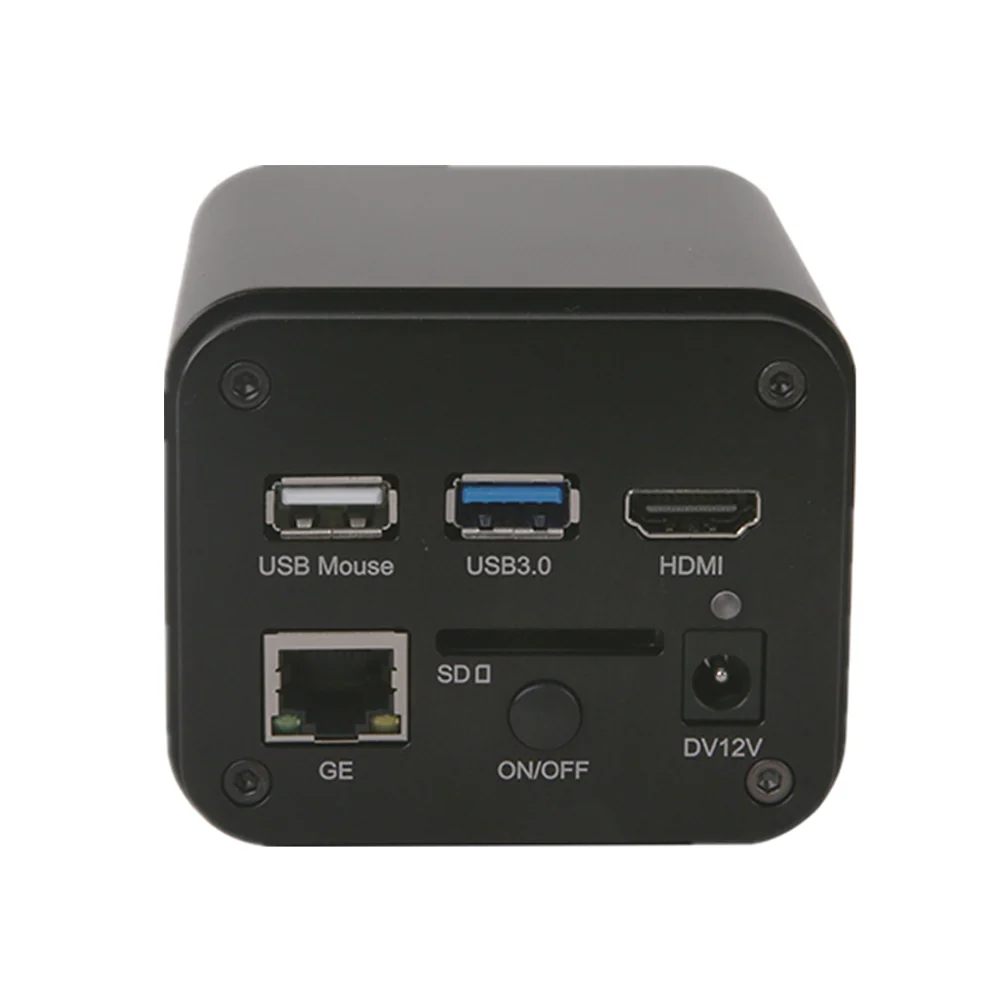
X7CAM4K HDMI USB WIFI Microscope Camera SONY IMX678/IMX585
View DetailsGuides and Applications
Frequently Asked Questions
What is the maximum frame rate over HDMI and WiFi?
60fps at 1920x1080 over HDMI, 25fps at 1920x1080 over WiFi
Can I record video directly to the SD card?
Yes. The camera supports ASF format video recording at 1080P 30fps on an 8GB SD card
Does the camera support remote control?
Yes. Use a USB mouse with XCamView software to control exposure, gain, white balance and other settings in real time
What operating systems are supported for USB connection?
Windows XP/Vista/7/8/8.1/10 (32 & 64 bit), macOS, Linux
Can I use this camera with a microscope that has a different tube diameter?
Yes, as long as the microscope has a C-mount interface. The camera uses a standard C-mount for attachment
What is the exposure range and how does it help in inspection?
Exposure ranges from 0.03ms to 918ms, allowing precise control in bright or low-light conditions, such as when inspecting reflective PCBs or dark micro-components
Request A Price On The XCAM1080PHB/D HDMI+WiFi Industrial Microscope Camera
Send quantity, destination and the application. We will confirm the configuration, the price and the lead time.